
Soldering Robot Traceability
Complete visibility for every soldering cycle
Automatically store process data, tip temperature, and video against each PCB serial number — so your team can investigate soldering defects whenever they appear.
Built for quality follow-up, not just data storage
The soldering robot can record what happened during each soldering program. When a joint fails inspection later — hours or days after production — your team can return to that exact board and review how it was processed.
Program Logs give you a clear production history: which program ran, which serial number was soldered, what temperature was used, how the cycle ended, and how the soldering looked on camera. Process data is recorded at a configurable interval (default 0.5 seconds). This record becomes the foundation for defect analysis and process improvement.
How traceability works
Three capabilities that turn every run into a useful quality record
Process recording
Capture soldering conditions during production with tip temperature history and camera video enabled. Process data is logged every 0.5 seconds by default, and the interval can be adjusted as needed. Even if no one was watching the line, the cycle can still be reviewed afterward.
- Camera video recording enabled for each run
- Data logged at 0.5 s interval (adjustable)
- Tip temperature and process parameters stored
Serial number tracking
The robot includes a barcode scanner to read the PCB serial number during production. Batch and serial details are stored with the log, so any board can be identified quickly.
- Barcode scanning on the machine
- Batch and serial linked to each run
- Fast lookup when a defect is found
Defect investigation
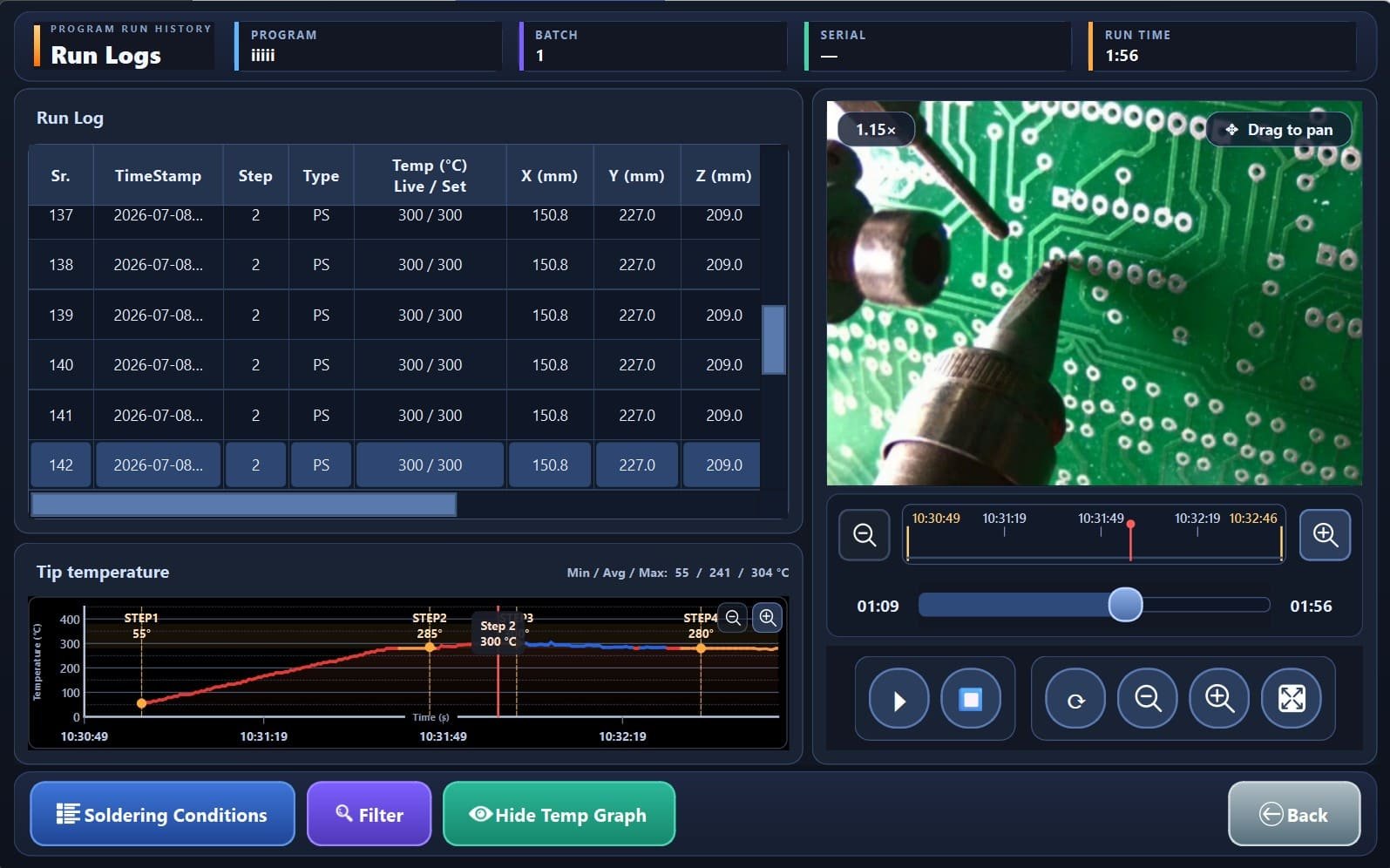
When a soldering issue is reported later, open the matching Program Log and review the run in detail. Video, temperature trends, and step data stay aligned so root-cause analysis is practical.
- Find the exact board and cycle
- Compare process data with visual evidence
- Support audits and customer queries
Review production history when it matters most
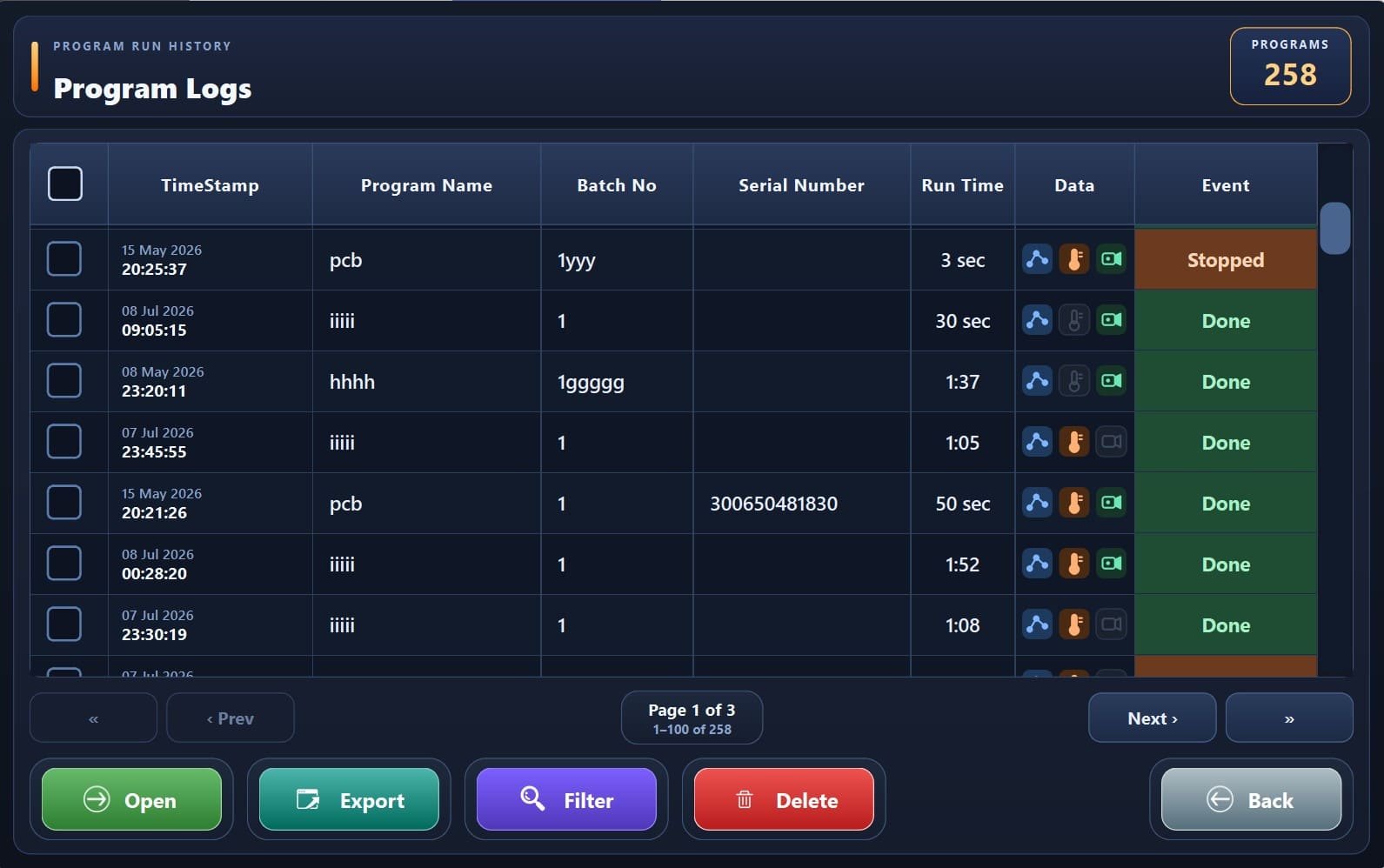
Program Logs store completed runs in an easy-to-browse history. Open any entry to study that cycle in detail — especially when a defect needs investigation after production.
Browse and filter
Search past runs by program, serial number, batch, or time. Status indicators show how each cycle ended and what data is available for review.
Open a Run Log
Study one soldering cycle with process steps, tip temperature graph, and recorded video together. Data points are captured at the set logging interval so you can jump to any moment and understand what happened.
Export when needed
Export selected runs or filtered history for quality documentation, customer communication, or internal process reviews.
Generate reports
Create production summaries over selected periods to understand outcomes, interruptions, and process trends across the line.
Why it matters on the shop floor
Practical advantages for quality, process, and production teams
Investigate later
Defects often appear after the run. Program Logs preserve the evidence you need for follow-up.
Faster root cause
Go straight from serial number to the matching cycle, then review process and video together.
Stronger quality records
Keep clear documentation of how each board was soldered for audits and customer queries.
Continuous improvement
Compare good and failed boards using real process history to refine soldering programs.
Related software features
Continue exploring soldering robot capabilities
Ready to strengthen soldering quality with full traceability?
Contact Slightgen Solutions to to get more information on the advance future of Soldering robot.